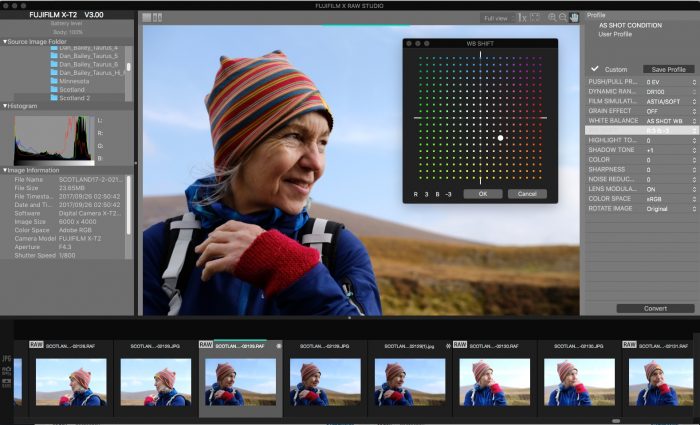
X RAW STUDIO is not designed to compete with programs like Lightroom, Luminar, On1 or Capture One, but rather offer an alternative solution that maintains the kind of consistency that other programs don't always do so well with when
you're processing Fuji X-Trans RAW files. And it offers some distinct advantages, which I discuss in more detail in my most recent blog
post.
What does this mean?
• Better Color and Sharpness
As you may know, the X-Trans sensor has a unique design, and not all RAW Processors do an exceptional job with Fuji RAW files with regards to sharpness and accurate color reproduction.
Most photo programs don't match the Fuji Film Simulations, and in fact, once you load a Fuji RAW file into any other RAW converter, your chosen Film Sim will be trashed and the color will revert to the "default" color profile for that software.
Also, some Fuji shooters find themselves frustrated by the "smudgy" look with things like foliage, skin and other fine
details when viewing RAW files in Lightroom.
Since Fuji designed the sensor, the camera, the color profiles and the software, X RAW STUDIO gives you the most accurate color reproductions, tonal gradations and exacting sharpness you expect from your X Series camera. In other words, VELVIA looks exactly
like VELVIA, ASTIA looks exactly like ASTIA and so forth...
And it allows you to create and save Custom Settings, just like you can do in the camera. This allows you to apply the same kind of creative processing to your RAW photos as if you were applying these settings in the the Q Menu while shooting.
• Faster
Converions
Since the actual processing is done inside your camera, X RAW STUDIO can speed up your RAW conversion workflow, especially if you have a slower or older computer. It opens RAW files very quickly and lets you do batch conversions as well.
I doubt that
few people will decide to use X RAW STUDIO as their main converter, but it does offer an interesting workflow alternative if you desire more sharpness or more accurate Fuji colors.
If you have one of the cameras listed above, then it's certainly worth checking out, , even if you only use it occasionally.
And, if you start creating custom settings profiles, like you can do in the camera, you might find it to be a pretty useful and fun program to use.